WordPress supports Gravatars (globally recognized avatars) by default. If a user uploads an image at Gravatar.com and associates it with their email address, any WordPress site that recognizes that email can display the Gravatar automatically.
However, not every author wants to use Gravatar. On a magazine site, some contributors prefer to email their photo to an editor rather than registering at Gravatar. To accommodate that, you can add a custom avatar option that integrates with WordPress’s built-in avatar system.
Below is a Custom Avatar feature that extends WordPress avatar functionality. It adds a “Custom Avatar URL” field to each user’s profile. When a custom avatar URL exists, the code will use that image with get_avatar() instead of the Gravatar. Because this approach extends WordPress’s existing avatar hooks, it plays nicely with themes and features that rely on get_avatar(), such as author boxes.
Adding the Custom Avatar Field
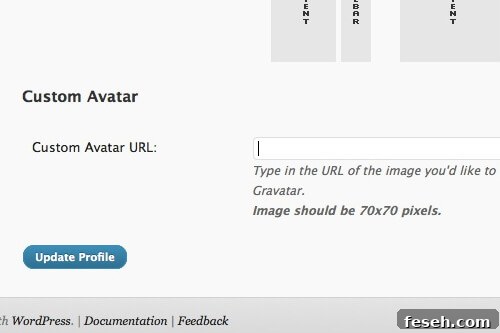
Create two functions: one to display the custom avatar field on the profile screen, and one to save the value when the profile is updated. The first function outputs a labeled input for the image URL and a short note about recommended image size.
Custom Avatar
Type in the URL of the image you'd like to use as your avatar. This will override your default Gravatar, or show up if you don't have a Gravatar.
Image should be 70x70 pixels.
Tell users to upload a square image at least as large as the biggest display size used on the site. For example, if the author box shows a 70×70 pixel avatar and the homepage uses 30×30, ask contributors to provide at least a 70×70 image to ensure clarity and avoid distortion.
Making It Work with get_avatar()
You can read the custom avatar URL with get_the_author_meta(‘be_custom_avatar’). Next, set up a filter on get_avatar() to return the custom image when present. The filter falls back to the Gravatar when no custom avatar exists, and finally to the default image if neither is available.
comment_author_email : $id_or_email;
if( is_email( $email ) && ! email_exists( $email ) )
return $avatar;
$custom_avatar = get_the_author_meta('be_custom_avatar');
if ($custom_avatar)
$return = ' ';
elseif ($avatar)
$return = $avatar;
else
$return = '
';
elseif ($avatar)
$return = $avatar;
else
$return = ' ';
return $return;
}
add_filter('get_avatar', 'be_gravatar_filter', 10, 5);
';
return $return;
}
add_filter('get_avatar', 'be_gravatar_filter', 10, 5);Behavior of the modified get_avatar():
- If the user has a custom avatar URL, that image is used.
- If no custom avatar is present, the normal Gravatar is used if available.
- If neither a custom avatar nor a Gravatar exists, the default avatar image is shown.
This approach keeps avatar management simple for your contributors while preserving compatibility with themes and features that depend on WordPress’s avatar system. You can further extend the solution to add image upload fields, validation, or automatic resizing if desired, but the minimal implementation above provides a straightforward, reliable custom avatar option.